Schlage Home
- 4.0
- Rating
- 1.00M
- Installs
- Free
- Price

 Analysis by App-foxy
Managing a smart lock from a phone sounds simple until you are standing outside with groceries, waiting for a command to finish, or trying to work out why a family member cannot get in. I spent time looking at Schlage Home from that practical angle rather than treating it as just another home-control app. It is a free House & Home app from Schlage Lock Company, LLC, intended for people who use compatible Schlage smart-lock hardware and want phone-based control in one place.
My overall impression is that the app makes the most sense as a companion to Schlage equipment, not as a general smart-home dashboard. That distinction matters. If you already have a supported Schlage lock, the app can reduce the need to handle everything manually. If you are still choosing hardware, however, the quality of the experience depends heavily on the lock model, your phone, your connection, and how many people need access. The software is only one part of that chain.
How Schlage Home feels in everyday use
I judge a smart-lock app by what it helps me manage and by how clearly it leaves responsibility in my hands. In this section, I’m looking at the practical routines around Schlage Home, including why I’d test an access workflow before relying on it during a rushed arrival. That everyday perspective also sets up a closer look at the controls and choices a household should understand.
You May Also Like

 Blood Strike: 2.5 Anniversary
Blood Strike’s Loadouts Turn Every Drop Into a Tactical Gamble
A close look at Blood Strike’s custom loadouts: how fast access to signature weapons reshapes its battle royale rhythm, rewards preparation, and narrows the gap between fights.

 Pandora - Music & Podcasts
Pandora’s Music Is Easy to Start, but Harder to Recover
Pandora’s strength is its low-effort path from a seed to a station. Its weak spot is how much confidence it asks you to place in connection, setup, and quiet recovery.

 8 Ball Pool
 Is Built on Rivalries, Rematches, and Routine
A close look at the rivalries, rematches, shared routines, and unanswered safety questions that turn a quick pool match into a persistent mobile community.

 Samsung Music
’s Quiet Strength Is Playing What You Already Own
Its reach comes less from spectacle than from dependable access to a personal library. That simplicity is both the app’s strongest retention engine and its ceiling.

 AccuWeather: Weather Radar
AccuWeather Review: A Quick, Clear Forecast for Everyday Decisions
For everyday plans, the best forecast is the one you can understand quickly. AccuWeather makes rain timing, radar, and local conditions easy to act on, with a few trade-offs.

 Hill Climb Racing
Why Hill Climb Racing Still Turns Crashes Into One More Run
A tiny car, a bumpy hill and one more upgrade: Hill Climb Racing keeps resurfacing because its simple chaos makes every near-miss feel personal.
More From Our News Desk
View All News


Speed expectations before you rely on it
The first thing I would tell a new user is not to think of a phone-controlled lock as an instant replacement for a physical key in every situation. A normal key gives immediate mechanical feedback. An app has to open, connect, communicate with the lock, and then show you the result. Even when the process feels smooth, that extra path can make a small delay feel much more important because you are often using it at the door.
Schlage Home is best approached as a control and management tool rather than a magic shortcut. The useful question is not whether it is always faster than turning a key, but whether it makes the situations around access easier. For example, being able to manage entry without handing over a spare key can be more valuable than saving a few seconds during your own arrival.
In my experience with apps in this category, perceived speed is shaped by preparation. Keeping the phone unlocked, having the app ready, and avoiding a weak connection makes a much bigger difference than repeatedly tapping the same control. I would also avoid testing the system for the first time when someone is waiting outside. Set it up while you are at home, learn where the important controls are, and keep a physical backup plan available.
The app’s current version is 7.0.2, which suggests an actively maintained product rather than an abandoned utility, but a version number alone cannot guarantee identical behavior on every phone. Updates can improve compatibility while also changing where controls appear. I recommend checking the interface after an update instead of assuming that a familiar button will remain in exactly the same place.
What happens during busy household moments
The strongest use case is a household where access changes throughout the day. Imagine leaving for work while a cleaner, relative, or delivery-related visitor may need to enter later. Instead of hiding a key or arranging a handoff, you can use the Schlage setup as the central place for handling access, provided your lock supports the relevant function. That is a meaningful convenience, especially for people who travel or manage a property from a distance.
Heavy use creates a different kind of challenge. A single person unlocking the door occasionally is a simple workflow. Several residents checking access, changing settings, or trying to use the app at the same time introduces more opportunities for confusion. The problem may not be raw app performance; it may be uncertainty about whether an action completed, whether another person changed something, or whether the lock and phone are communicating through the expected route.
I found that the safest habit is to pause after an action and verify the result rather than immediately repeating it. Repeated taps can turn a momentary delay into a confusing sequence of commands. If the door is open or closed, look at the physical result when possible. If you are granting access to someone else, tell that person what to expect and give them a backup way to contact you.
Another practical scenario is a child arriving home before the adults. A phone-based option can be easier than carrying a key, but it also shifts responsibility to the child’s phone battery, account access, and comfort with the app. For that reason, I would not treat the app as the only safety plan for a young user. A household should decide in advance what happens if the phone is lost, offline, damaged, or left at school.
Stability matters more than flashy controls
For a smart-lock app, stability is not just about avoiding crashes. It includes clear status feedback, predictable sign-in behavior, and a sensible recovery path when a command does not complete. A lock is a physical object, so uncertainty is more serious than it would be in a casual entertainment app. I care less about decorative interface details than knowing whether the requested action actually reached the hardware.
Schlage Home benefits from being focused on Schlage’s own lock ecosystem. Compared with a broad smart-home platform, a dedicated companion app has a narrower job and can feel less cluttered when all you want is access management. The trade-off is that it is not the obvious choice for someone who wants one application to control unrelated lights, cameras, thermostats, and locks from multiple brands.
When the app behaves normally, that focused approach is reassuring. There are fewer unrelated devices competing for attention, and the purpose is clear. When something goes wrong, though, the narrow ecosystem becomes more noticeable: the app cannot compensate for a lock that is out of range, a phone that has connectivity trouble, or a setup that does not match the supported hardware. This is why I would judge it as part of a complete Schlage installation, not in isolation.
Recovery should begin with simple checks rather than frantic troubleshooting. Confirm that the phone has power, check the connection, make sure you are using the intended account, and inspect the lock itself. Close and reopen the app only after noting what happened, because repeatedly restarting can make it harder to tell whether the original command succeeded. If you are at the door, use the physical method available to you instead of turning a software delay into a lockout.
Phone and operating-system limits
The listed minimum operating-system requirement is 11, so anyone using an older phone should check compatibility before building a home-access routine around the app. That requirement is reasonable for a modern connected-home tool, but it can matter in families that share older devices or keep an inexpensive spare phone for emergencies.
Device constraints go beyond the operating system. A phone with very little free storage, an aging battery, aggressive background restrictions, or unreliable connectivity may make any smart-lock experience feel inconsistent. Those are not necessarily faults in Schlage Home, but they affect the result you experience at the door. I would keep the app updated, avoid testing it only on a nearly empty battery, and make sure the person who needs access can use the phone comfortably.
The app is rated Everyone, which fits its household-management purpose, but that does not mean every setup is equally suitable for every household. Older adults may prefer a physical key or a simpler routine. Someone who dislikes account-based services may be happier with a conventional lock. A renter also needs to consider whether the existing hardware and property rules allow the relevant Schlage installation before treating the app as an option.
Resource demands are difficult to judge from the app’s store presence alone, and I would not choose it based on a promise of unusually low battery or memory use. In normal use, the important performance question is whether it remains practical on the phone you already carry. If installing it causes you to replace a reliable device or keep a second phone charged, the convenience calculation changes quickly.
Three habits that make the setup more dependable
First, establish a primary-user routine before adding other household members. Decide who will manage access, who should only use the lock, and who should be contacted when something goes wrong. This prevents the common mistake of giving several people responsibility without agreeing on how changes are communicated.
Second, test the complete arrival scenario rather than only the first setup screen. Stand outside, use the phone you expect to carry, and confirm that you understand the feedback after an action. Then repeat the exercise with the phone’s battery lower than usual or the connection less ideal. This does not guarantee perfect behavior, but it exposes confusing steps while you still have a key and an open door nearby.
Third, treat access changes as household administration. If a visitor no longer needs entry, remove or adjust that access promptly and tell the person who manages the home. The benefit of digital control is not simply opening the door remotely; it is being able to keep access organized over time. That advantage disappears if nobody knows which permissions are current.
Where it beats the usual alternatives
Against a traditional key, Schlage Home offers convenience for shared access and situations where you cannot physically hand someone a key. A key is still simpler, does not need charging, and usually gives immediate tactile confirmation. For a person who lives alone, rarely has visitors, and values maximum simplicity, the traditional option may remain better.
Against a generic smart-home hub, the dedicated Schlage approach can be easier to understand if your main goal is the lock itself. A multi-brand platform may be preferable when your home already revolves around one ecosystem and you want scenes or controls across many device types. The choice is therefore less about which app is universally superior and more about whether your hardware and household habits are centered on Schlage.
Against keypad-only access, a phone app can provide more flexibility for the owner, but it introduces phone-related dependencies. A keypad is useful when guests do not want to install an app or create an account. Schlage Home is more attractive when the owner wants centralized management and is comfortable making the smartphone part of the access routine.
Who should use it, and who should skip it
I would recommend Schlage Home to Schlage smart-lock owners who want a dedicated companion for controlling and organizing access. It is particularly suitable for households with changing visitor needs, people who manage a second property, and users who are comfortable keeping their phone charged and their account details secure. The free price also makes it easy to try alongside compatible hardware without adding a separate app subscription to the decision.
I would be more cautious if you need guaranteed access during poor connectivity, dislike smartphone-dependent routines, or expect one app to manage a mixed collection of home brands. I would also skip making it the sole emergency method for children, older relatives who struggle with phone interfaces, or anyone who regularly forgets a phone. In those cases, a physical key, keypad, or another agreed backup should remain part of the plan.
The app has reached over 500 thousand installs and holds an average rating of 4.0 from around 13 thousand ratings, with roughly 6.1 thousand written reviews. Those figures show that it has a substantial user base and a generally positive reception, but they should not replace checking whether your particular Schlage lock and phone combination fit your needs.
My performance verdict
Schlage Home is a sensible, focused app for people already committed to Schlage smart-lock hardware. I like its potential to simplify shared access and reduce the awkwardness of spare keys, especially for households that regularly coordinate visitors. Its main weakness is not that it tries to do too little; it is that the experience depends on several links working together, from the phone and operating system to connectivity and the lock itself.
For everyday use, I would call its performance practical rather than transformative. Prepare the setup, learn the recovery routine, verify important actions, and keep a backup access method. With those habits, the app can be a useful part of a modern home-entry system. Without them, a small delay or dead phone can feel disproportionately stressful.
Schlage Home is free, intended for Everyone, and developed by Schlage Lock Company, LLC. Released on August 15, 2017, it has had time to mature into a recognizable companion for the brand’s connected locks. My recommendation is straightforward: choose it when your priority is managing compatible Schlage access from a phone; choose a simpler physical or keypad solution when reliability independent of phones matters more than remote convenience.
My bottom line: this is a worthwhile companion app for the right Schlage household, but it should support a well-planned access routine rather than become the only thing standing between you and your front door.
FAQs for Schlage Home
01What is the Schlage Home app used for?
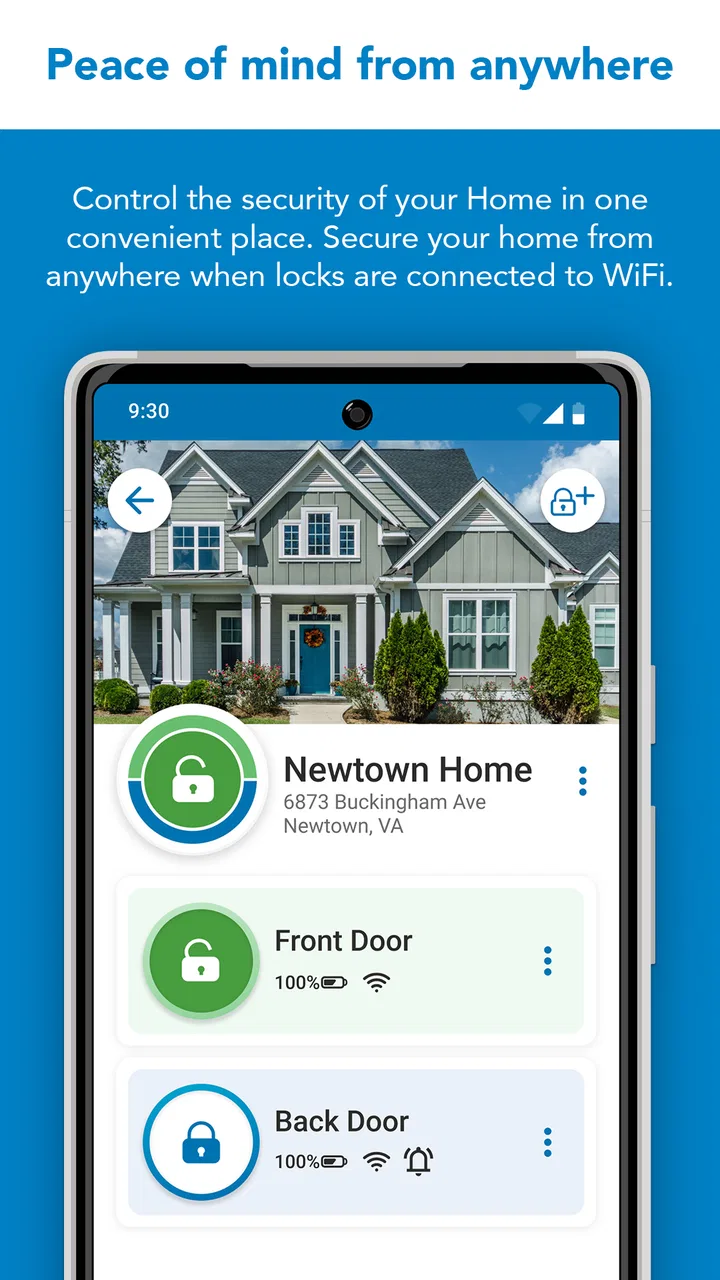
The Schlage Home app is designed to provide users with remote access and control over their Schlage smart locks. It allows you to lock and unlock doors, manage access codes, and receive real-time notifications about lock activity directly from your smartphone, enhancing both security and convenience.
02Is the Schlage Home app compatible with all Schlage locks?
The Schlage Home app is compatible with select Schlage smart locks, such as the Schlage Encode and Schlage Sense models. It's important to verify compatibility with your specific lock model before downloading the app to ensure full functionality and access to features.
03How secure is the Schlage Home app?
The Schlage Home app employs advanced encryption and security protocols to protect your data and ensure the safe operation of your smart lock. Regular updates are provided to address potential vulnerabilities, making it a reliable choice for managing home security.
04Can multiple users access the Schlage Home app?
Yes, the Schlage Home app allows multiple users to access and control the same smart lock. You can create and manage multiple access codes for family members, friends, or trusted individuals, and customize access levels according to your preferences.
05Does the Schlage Home app require a subscription?
The Schlage Home app itself does not require a subscription. However, certain features, like advanced monitoring or integration with other smart home systems, may require additional services or compatibility with external platforms. It's best to check the app's specific requirements for full functionality.
Pros
- User-friendly interface enhances setup.
- Supports multiple user access easily.
- Real-time lock status updates.
- Customizable access codes for guests.
- Integration with smart home devices.
Cons
- Limited offline functionality.
- Occasional connectivity issues.
- Requires specific hardware compatibility.
- Battery usage can be high.
- No web-based control option.

Schlage Home
Gallery